Context menu of element editing
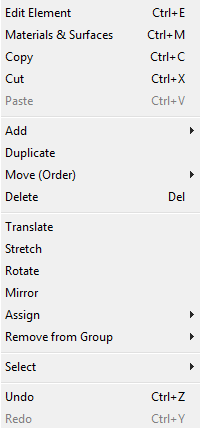 The
context menu of element editing can be exposed from various
editing windows when the right mouse
button is depressed.
The
context menu of element editing can be exposed from various
editing windows when the right mouse
button is depressed.
The set of functions supplied within this context menu depends on the actual number of elements selected from the element list.
| Edit Element. (Ctrl-E) |
Exposes the Element Editor window. |
| Materials&Surfaces (Ctrl-M) |
Exposes the Materials and/or Surfaces window. |
| Copy (CTRL-C) | Creates a copy of currently selected element(s) and places
it onto the clipboard. Element(s) can then be pasted from it See also: Paste |
| Cut (Strg-X) | Currently selected elements are deleted from the element
list, but their copies are placed onto the clipboard. Element(s) can then be
pasted from it. See also: Paste, Delete |
| Paste (Strg-V) | Element(s) currently on the clipboard are insert just
beyond the one currently selected in the
element list (or
appended to the end of
element list if
none or several elements are selected). After being inserted all these elements are marked selected thus being ready for further processing (Translate, Rotate, Mirror etc.). See also: Duplicate |
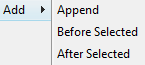
| Add→Append | Appends a new element (of type "Empty") to the end of element list |
| Add→Before Selected | Inserts a new element (of type "Empty") just before the one currently selected into the element list. |
| Add→After Selected | Inserts a new element (of type "Empty") just after the one currently selected into the element list. |
| Duplicate | Inserts a copy of currently selected elements into the
element list. Remark: Holding SHIFT-key while that menu is activated will additionally swap coordinates of the duplicate.
If several elements are selected their copies are appended to the end of
element list retaining their order. |
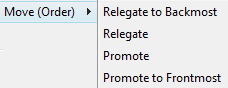
| Move (Order)→Relegate to Backmost | Reorders selected element(s) in the
element list to the "backmost" position. The element is then located
at the beginning of the list thus now being
potentially overlapped by
all other elements. If more elements are selected then each one is relegated by the same distance as the backmost selected one. This action is inhibited if the chosen element does already occupy the first (backmost) location in the list. |
| Move (Order)→Relegate | Reorders selected element(s) in the
element list one position "backwards". The element is then located
earlier in the list thus now being potentially
overlapped by another element which have thus been promoted to the
location of the element relegated. If more elements are selected then each one is relegated by one position in the list order. This action is inhibited if the chosen element does already occupy the first (backmost) location in the list. |
| Move (Order)→Promote | Reorders selected element(s) in the
element list one position
"towards front". The element is then located later in the list thus now
potentially overlapping
another element which have thus been relegated to the location of the
element promoted. If more elements are selected then each one is promoted by one position in the list order. This action is inhibited if the chosen element does already occupy the last (front most) location in the list. |
| Move (Order)→Promote to Frontmost | Reorders selected element(s) in the
element list to the "frontmost" position. The element is then located
at the end of the list thus now
potentially overlapping all other elements. If more elements are selected then each one is promoted by the same distance as the frontmost selected one. This action is inhibited if the chosen element does already occupy the last (front most) location in the list. |
| Delete (DEL key) | Deletes (irrevocably) currently selected element(s) from
the element list. After deletion of single element is executed the selection moves to a foregoing element. When first element is deleted the selection move to the element advanced to first positon. Deletion request of one or more elements is executed after being additionally confirmed in a dialog window shown. See also: Cut |
| Translate | Provides a
translation of one or many elements by a distance (dX,dY,dZ)
entered in the
window Translate . Remark: Translation itself is invoked from the Translation window. |
| Stretch | Provides stretching of one or many elements by a specified distance in specified coordinate direction. Extension (or shrinking) of elements is given by specific plane coordinate selection an shift interval within the Stretch window. |
| Rotate | Provides rotation of one or more elements around an axis parallel to one of coordinate axes. The position of the rotation axis is given by the choice of one rotation plane and two coordinates within the window Rotate. |
| Mirror | Provides mirroring of one or more elements to a plane parallel to one of coordinate planes. The position of mirroring plane is given by the choice of mirroring direction and its coordinate position in the window Mirror. |
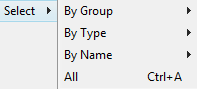
| Select→By Group→... | Selects all elements assign to one specific
Group (the group
name). Remark: The menu offers a list of all available groups to chose from. If there are no groups used yet this menu has no function. Remark: For 3D-Layered models the selection operation is applies only to currently active layer. |
| Select→By Type→... | Selects all element of one specific type (Empty,
Material, Space, etc.) Remark: For 3D-Layered models the selection operation is applies only to currently active layer. |
| Select→By Name→... | Selects all elements having one specific name. Remark: The menu offers a list of all names - names of spaces, power sources, surfaces and materials) to chose from. Remark: For 3D-Layered models the selection operation is applies only to currently active layer. |
| Select→All (CTRL-A) | Select all elements. Remark: For 3D-Layered models the selection operation is applies only to currently active layer. |
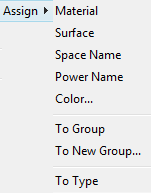
| Assign→Material→... | Assign a material to all selected material boxes. All
materials used in the project so far are offered for choice. Remark: If within current selection there are elements of type incompatible with the assignment to be performed, the action is executed on compatible elements only after additional user confirmation dialog. If several elements are selected user's confirmation is also requested by a dialog. Error message is shown if neither element matches the expected type. |
| Assign→Surface→... | Assign a surface to all selected space boxes. All surfaces used in the project so far are offered for choice. Remark: If within current selection there are elements of type incompatible with the assignment to be performed, the action is executed on compatible elements only after additional user confirmation dialog. If several elements are selected user's confirmation is also requested by a dialog. Error message is shown if neither element matches the expected type. |
| Assign→Space name→... | Assign a space name to all selected space boxes. All space
names used in the project so far are offered for choice. Remark: If within current selection there are elements of type incompatible with the assignment to be performed, the action is executed on compatible elements only after additional user confirmation dialog. If several elements are selected user's confirmation is also requested by a dialog. Error message is shown if neither element matches the expected type. |
| Assign→Power name→... | Assign a power source name to all selected power source
boxes. All power source names used in the project so far are offered for
choice. Remark: If within current selection there are elements of type incompatible with the assignment to be performed, the action is executed on compatible elements only after additional user confirmation dialog. If several elements are selected user's confirmation is also requested by a dialog. Error message is shown if neither element matches the expected type. |
| Assign→Colour... | Assign a colour to all selected element (standard colour
dialog is shown) See also: Element Editor |
| Assign→To Group→... | All selected elements are assigned to the
group name
chosen (in addition to group assignments already in place). Remark: The menu offers a list of all groups used in the project so far to chose from. If there are no groups used yet this menu has no function. |
| Assign→To New Group... | A dialog will be offered to enter the group name. All selected elements are assigned to the group name entered (in addition to group assignments already in place). |
| Assign→To Type→... | The type of currently selected element(s) will be changed to the one of
|
| Remove from Group | Assignment to one specific
group name is
deleted from all selected elements. Remark: The menu offers a list of all groups applicable to selected elements to chose from. If no one of selected elements is assigned to any group this menu has no function. |
| Undo (Ctrl-Z) | Undoes (reverts) the latest action(s) in the given
editing context. |
| Redo (Ctrl-Y) | Redoes (reapplies) the action lately undone in the given
context. |
Important: Shortcuts shown above CTRL-A, CTRL-C, CTRL-X, CTRL-V, DEL of this context menu are not available with Element-Editor window. These key combinations have further specific functions respective to input fields of Element-Editor window.
See also: Element Editor, Element selection window, Elements 2D window, Elements 23 window, Editing windows (Input windows)