Material Editor window
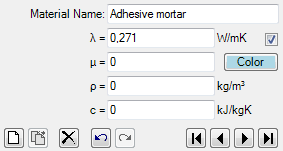 Material
Editor is used to maintain properties of material. This window is displayed as
part of
materials window.
Material
Editor is used to maintain properties of material. This window is displayed as
part of
materials window.
| Material Name | Name of material. It is used for documentation purpose. |
| λ (lambda) | Thermal Conductivity of the material. |
| μ (mue) |
 Water vapour diffusion resistance of the material. Water vapour diffusion resistance of the material. |
| ρ (rho) | Mass density of the material. |
| c (ce) | Heat capacity of the material. |
 Colour and AutoColour |
Provides the ability to assign any distinctive colour to the
element identifying it in graphical views and evaluations. To select the colour click onto the coloured rectangle labelled "Colour" - it will expose colour selection dialog. Remark: By default the colour is automatically assigned when change to lambda value is applied, based on predefined colour table. Removing the checkmark will turn the "auto-colour by lambda" application setting off thus assigned colour will be retained during changes to the value of lambda. |
| New | Adds a new entry to the material list and selects it for editing. |
| Delete | Deletes the currently selected material from material list. |
| Prev. | Selects previous material in the material list for editing. |
| Next | Selects next material in the material list for editing. |
Important: Changes to material properties in the project specific material list do not automatically propagate to properties of construction elements. Applying new material properties to selected elements must be done explicitly - either by a double-click onto a material list item or via a drag-drop operation from material list .
Remark: The equivalent heat conductivity of small air cavities and air gaps can be calculated with the air cavity calculator tool.
Note: You shall switch between input fields by using the TAB-key. Using that key confirms the data entry. On the other hand it provides a good alternative compared to permanent mouse use.
See also: Materials window, Air Cavity Calculator (Tool)